Building Fretwork and Solfège
A guitar-string randomizer grew into practice tools for Christyl's music classes.
The brief
I started with a single HTML file that picked notes on a guitar string. My wife, Christyl, needed practice material she could adjust while teaching beginners. The first request was four measures with a time signature and proper engraving. Then came more strings, bass, solfège, chord changes, and a view large enough to project in class.
The constraints stayed concrete. A new guitarist might need natural notes on the high E string in first position. A class might need the same pitch for an entire measure before changing notes. Christyl needed to save an exercise she liked and give students a link that opened the exact lesson. Students needed no account.
I kept one source tree and built two Firebase Hosting sites from it. Fretwork covered guitar, bass, and chords. Solfège had its own address and green theme. The shared practice engine kept playback, rhythm, display controls, and saved exercises consistent across both.
Randomness with a lesson in mind
The first-position and natural-note controls needed to work together. Choosing first position, then natural notes, had to remove accidentals from that selection. I made those controls filters over the current frets. Each string kept its own selection, so adding another string did not force both strings to use the same fret numbers.
Rhythm added a second constraint. I represented durations in eighth-note units and filled each measure to the selected meter. That kept the generator and the saved-exercise validator in agreement about what counted as a complete bar.
The request to end with a whole note exposed a useful edge case. A whole note or two half notes filled 4/4, but neither filled 3/4 or 6/8. I kept the selected meter and used a dotted half note for those endings. The ending option had to respect the time signature.
Some patterns need to exclude others
Solfège's Scale option walked from the lowest selected pitch to the highest and back down. I disabled Start on Do and More repetition while it was active. Those rules described different sequences, and combining them would make the result ambiguous.
The score had to fill a classroom
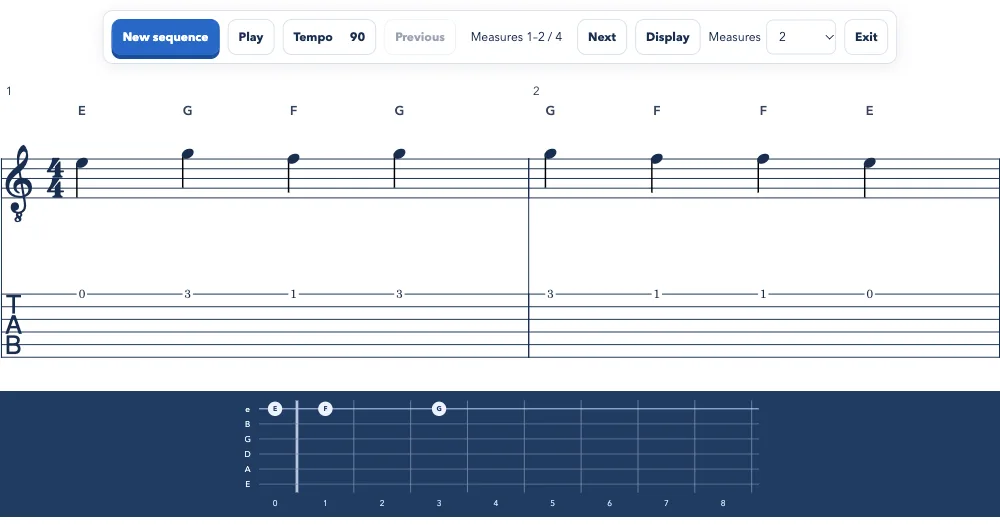
The normal page had settings, playback controls, and a library. Projecting that page wasted space on controls students did not need. I added a classroom view with the staff, optional tablature, and the fretboard or solfège guide. The teacher's toolbar hid after inactivity and returned on a tap or pointer movement.
Showing fewer measures made a larger difference than removing margins. I let Christyl show one, two, three, or four measures at a time. Previous and Next moved through the existing exercise. Resizing the score and generating a new exercise became separate operations, so advancing the class never changed the notes they were reading.
The fretboard needed a different compromise. Enlarging a short section of one selected string removed the context beginners used to orient themselves. I kept all six guitar strings visible and showed a wider section of the neck, while retaining the notes the exercise required. The score took most of the available height.
The click target was larger than the note
Each staff note got a transparent target that included its label. A click played the note and selected the playback start. I showed the outline on hover or during playback, so the clickable areas did not turn the staff into a row of permanent boxes.
A chord name wasn't enough
Christyl supplied the chord sheets she used in class. Her first eight included Asus2 and Cadd9. Cadd9 appeared on both sheets, which left fifteen unique chords in the proposed Top 16. I added C major as the sixteenth and left it unchecked by default, preserving her teaching order.
A general chord library could provide many ways to play each name. I needed the classroom shape to remain identifiable among those alternatives. I gave each shape a stable ID and checked imported voicings against their fret positions, sounding pitches, and chord intervals. I excluded entries whose data did not agree.
I used VexFlow for staff notation and drew chord diagrams as SVG. Christyl wanted the standard chart beside the same shape rotated 90 degrees clockwise, to help students relate the chart to the guitar in their hands. I transformed the grid coordinates and kept the labels upright. Rotating the entire SVG would have turned the finger numbers sideways too.
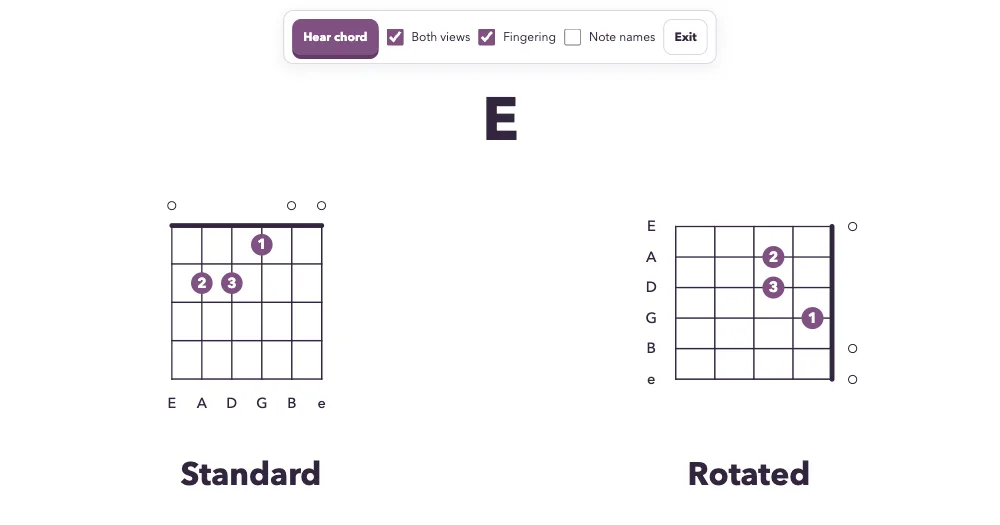
The progression builder added another distinction: the available chord buttons and the sequence already on the page needed separate state. Christyl could click to add chords, drag them into order, or use move buttons on a phone. Changing the key filter changed the available buttons while preserving the progression she had composed.
A teacher's fingering belonged to a shape
Account overrides stored six finger numbers against a shape ID. I checked that a repeated finger stayed on one fret and that a barre did not cross an open or lower fret. Favorites and shared snapshots retained the finger numbers used for that lesson.
Holding the vowel in Do
For guitar, I reused the classical sound font from my iOS flashcard app and added steel-string, electric, and bass sounds. A Python script rendered the needed pitches with FluidSynth and converted them to MP3. The browser loaded the pitches required by the exercise. A chord used those same notes, staggered across the strings, with the order reversed for an upstroke.
Solfège needed a voice that could hold a syllable for the written duration. Looping a whole recording would repeat the initial consonant. I kept the opening of each sample, measured its pitch, found a stable section of the vowel, and blended the loop boundary. Playback transposed the sample to the selected key and sustained the vowel.
Chromatic mode exposed the limit of the recordings. The available voices covered the original syllables, but altered syllables such as Di and Ra needed different consonants. I kept Tone available and used it for altered syllables. I also omitted hand signs for the altered syllables.